LeakLytics User Guide
Welcome to LeakLytics! This guide will help you quickly set up your water leak detector so you can protect your facilities from water damage.
1. Getting Started
Your LeakLytics device runs on 2x AA batteries.
To power on your device:
- Open the battery compartment on the back of the device.
- Insert 2x AA batteries, making sure the positive (+) and negative (-) ends match the markings inside.
- Close the battery compartment.
2. Connecting to Wi-Fi & Setup
Before your device can send you email or WhatsApp alerts, you need to connect it to your Wi-Fi network.
Step 1: Enter Setup Mode
When you power on the device for the very first time, it automatically enters Setup Mode. The Green light will start flashing.
Note: If you need to reconfigure the device later, you can manually enter Setup Mode by pressing and holding the button on the device for 3 seconds right after inserting the batteries.
Step 2: Connect to the Device
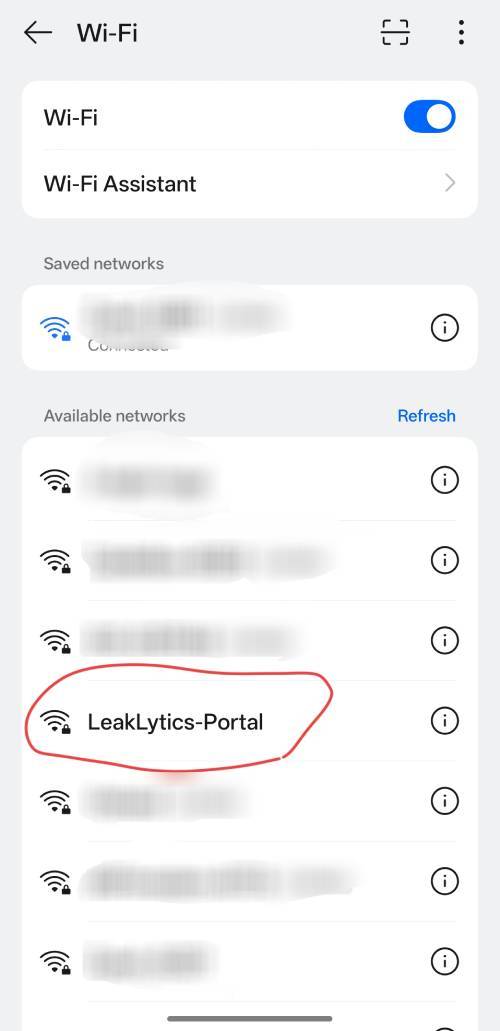
- On your smartphone or computer, open your Wi-Fi settings.
- Look for a new Wi-Fi network named
LeakLytics-Portal(the X's will be numbers/letters) and connect to it. The default password isLEAK-ADMIN.
Step 2b: Get Your WhatsApp API Key (Optional)
To receive WhatsApp notifications, you must first get your free API key from CallMeBot:
- Add the phone number +34 694 29 84 96 to your phone's contacts (you can name it "LeakLytics Bot").
- Send the exact message "I allow callmebot to send me messages" to this new contact using WhatsApp.
- Within a couple of minutes, the bot will reply with your API Key (e.g.,
123456). Write this down!
Step 3: Enter Your Details
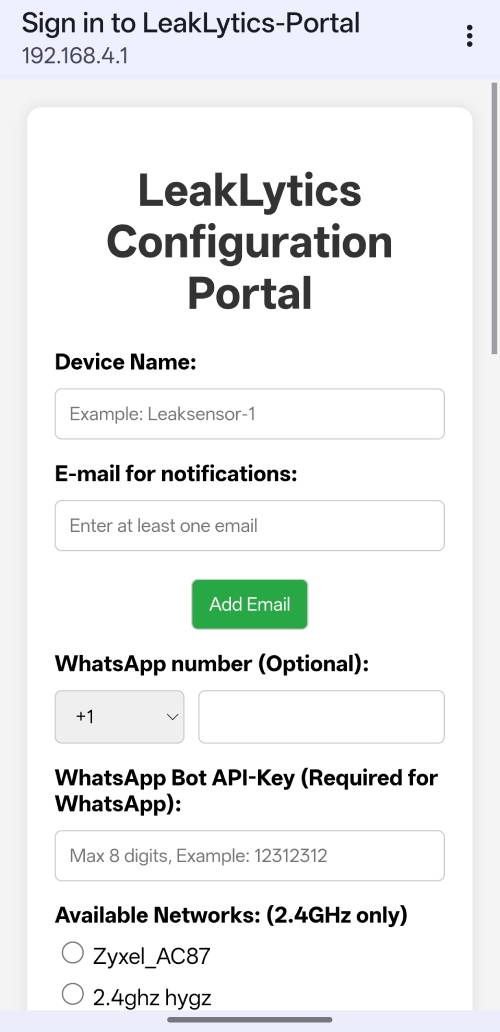
- Once connected to the device's Wi-Fi, a setup screen should automatically pop up on your phone. (If it doesn't, open your web browser and go to
http://192.168.4.1). - Select your home Wi-Fi network from the list and enter your password.
- Enter your Email address. To enable WhatsApp alerts, enter your phone number (with country code, e.g., +34...) and the API Key you received in Step 2b.
- Change WiFi AP Password (Highly Recommended): You will see a red security warning at the top of the portal. Scroll down to the "Change WiFi AP Password" field and enter a new secure password (minimum 8 characters) to replace the default
LEAK-ADMIN. - Click Save.
The device will restart and connect to your home Wi-Fi. The green light will turn off, meaning the device is now asleep and actively protecting your home!
3. Placing Your LeakLytics Sensor
Your device uses the GDL3 Flat Liquid Leakage Sensing Strip. This ultra-thin (0.2mm), highly sensitive cable features a 3.5mm audio-style plug that easily connects right into your LeakLytics device.
To install the sensing strip:
- Plug the 3.5mm jack of the GDL3 cable into the audio port on your LeakLytics device.
- Unroll the flat cable and place it in areas prone to water leaks. Good locations include:
- Under the kitchen or bathroom sink.
- Circling the base of the washing machine or water heater.
- Server rooms or data centers.
- You can use double-sided tape to secure the strip directly to the floor or baseboards.
Note: The GDL3 strip is reusable! If it gets wet, simply wipe it completely dry to reset the sensor. The cable also features a double-insurance design—even if one section is damaged, the rest of the cable will continue to monitor effectively.
4. What Happens During a Leak?
If water touches the GDL3 sensor probe, LeakLytics will immediately wake up and alert you!
When a leak is detected:
- Loud Alarm: The device will sound a loud, sweeping siren.
- Red Light: The red warning light will flash rapidly.
- Notifications: You will receive an immediate Email and/or WhatsApp message alerting you to the leak.
How to stop the alarm:
- Fix the source of the leak and dry off the sensor probe.
- Press the button on the device to silence the alarm.
- The Green light will turn on temporarily to confirm the alarm has been cleared.
5. Battery Life & Maintenance
Your device is designed to last a long time on 2x AA batteries by spending most of its time in a power-saving "deep sleep" mode.
Low Battery Warnings
When your batteries start running low, LeakLytics will send you a warning notification via Email or WhatsApp. Please replace the 2x AA batteries as soon as you receive this alert.
Factory Reset
If you ever move, forget your custom AP password, or need to completely erase your saved Wi-Fi and alert settings, remove and reinsert the batteries, then press and hold the button for 15 seconds. This will also restore the default LEAK-ADMIN password.